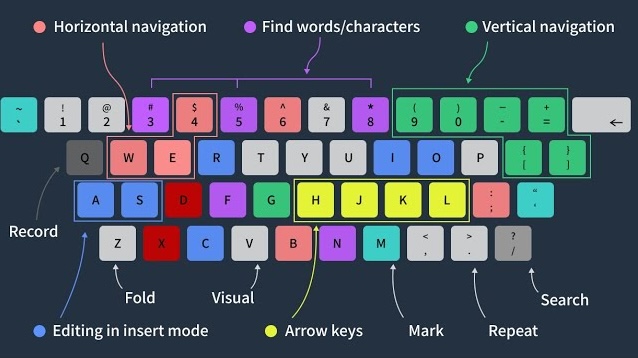
Vim is a powerful, open-source text editor. It is unique in that you spend most of your time in Normal Mode where key presses execute commands that move and edit text, as opposed to Insert Mode where key presses enter text like a traditional word processor. There is also a Visual Mode and Command Mode, subjects for another post.
Movement Commands
h, j, k, l |
left, down, up, right |
w, W, b, B, e, E |
word forward/backward, to start/end |
0, ^, $ |
beginning, first non-blank, or end of line |
f, t, F, T |
find (or up to) forward/backward |
(, ), {, } |
sentence or paragraph, forward/backward |
H, M, L |
move cursor to top, middle, bottom of screen |
zt, zz, zb |
move screen so cursor is top, middle, bottom |
Ctrl-F, Ctrl-B, Ctrl-D, Ctrl-U |
full page, half page, up and down |
gg, G |
top, bottom of doc |
/, ?, n, N |
search forward/backward, next result |
*, # |
next/previous instance of word |
| double back tick | jump to last cursor location |
% |
jump to matching enclosing (paren, bracket, brace) |
Editing Commands
i, a, I, A, o, O |
insert before/after cursor, start/end of line, next/previous line |
x, r, s |
delete/replace character and go to Normal/Insert Mode |
y, Y, yy, p |
copy (end of line, whole line), paste |
d, dd, c |
delete (whole line), change |
u, ., Ctrl-r |
undo, repeat, redo |
>>, << |
indent, outdent |